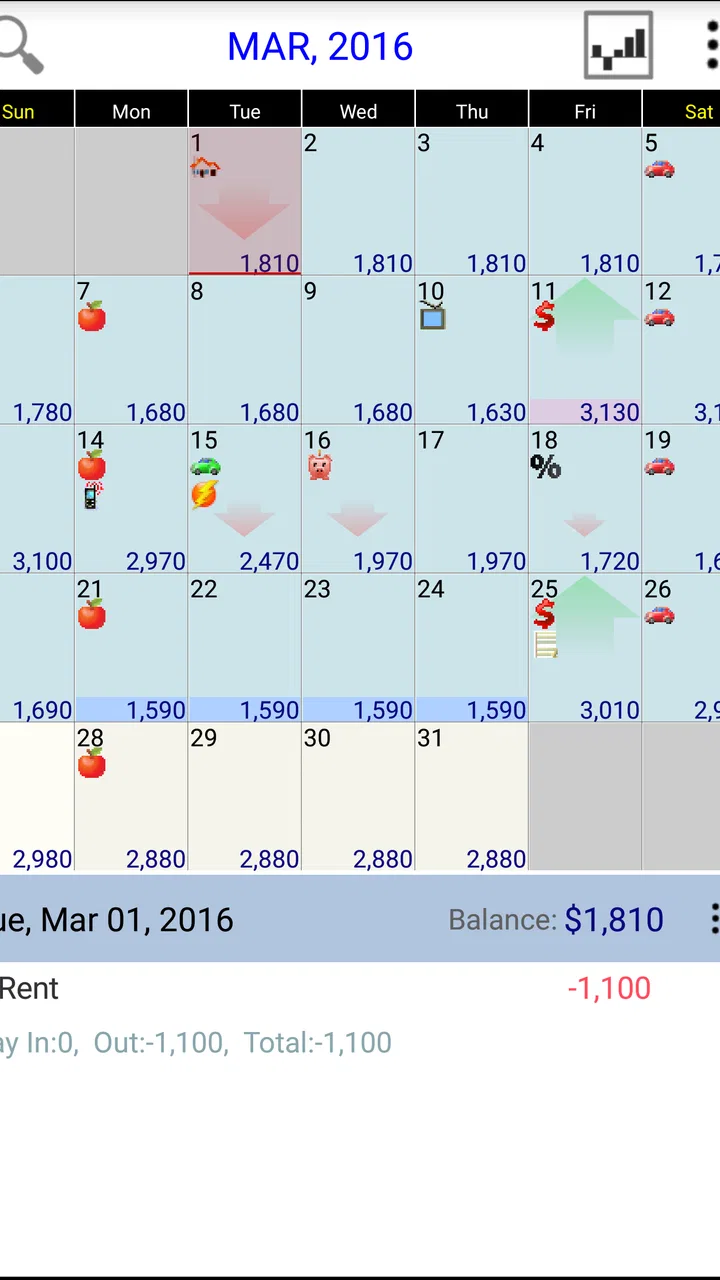
Budget Calendar
- 4.8
- Rating
- 10.00K
- Installs
- $4.95
- Price

 Analysis by App-foxy
I usually judge a budgeting app by one simple question: does it help me make a better decision before I spend money, rather than merely showing me what I already spent? Budget Calendar takes that practical approach. It is a finance app from MiShell Software Systems that places budgeting on a calendar, making upcoming income and expenses easier to view in relation to one another. After using it, I found the idea more useful than a conventional list of transactions when my main concern was timing.
The app is aimed at people who want a forward-looking view of their money. Instead of treating a budget as a collection of isolated categories, it encourages me to think in terms of dates: when money arrives, when a bill is due, and how much room remains between those events. That makes it particularly relevant for managing recurring household costs, paydays, subscriptions, and other commitments that can feel manageable individually but awkward when they cluster together.
How the calendar approach changes everyday budgeting
When I look at budgeting through a calendar, I pay closer attention to the order of events, not just the month-end total. That shift can make it easier to spot when a planned purchase competes with a bill or arrives before expected income. I’d use that perspective to consider how the app’s long-running version fits into a routine, and what existing users should reasonably expect from it.
You May Also Like

 Blood Strike: 2.5 Anniversary
Blood Strike’s Loadouts Turn Every Drop Into a Tactical Gamble
A close look at Blood Strike’s custom loadouts: how fast access to signature weapons reshapes its battle royale rhythm, rewards preparation, and narrows the gap between fights.

 Pandora - Music & Podcasts
Pandora’s Music Is Easy to Start, but Harder to Recover
Pandora’s strength is its low-effort path from a seed to a station. Its weak spot is how much confidence it asks you to place in connection, setup, and quiet recovery.

 8 Ball Pool
 Is Built on Rivalries, Rematches, and Routine
A close look at the rivalries, rematches, shared routines, and unanswered safety questions that turn a quick pool match into a persistent mobile community.

 Samsung Music
’s Quiet Strength Is Playing What You Already Own
Its reach comes less from spectacle than from dependable access to a personal library. That simplicity is both the app’s strongest retention engine and its ceiling.

 AccuWeather: Weather Radar
AccuWeather Review: A Quick, Clear Forecast for Everyday Decisions
For everyday plans, the best forecast is the one you can understand quickly. AccuWeather makes rain timing, radar, and local conditions easy to act on, with a few trade-offs.

 Hill Climb Racing
Why Hill Climb Racing Still Turns Crashes Into One More Run
A tiny car, a bumpy hill and one more upgrade: Hill Climb Racing keeps resurfacing because its simple chaos makes every near-miss feel personal.
More From Our News Desk
View All News


Planning around dates instead of only totals
Many finance apps begin with a monthly total or a list of categories. That can work well for checking whether I stayed under a spending limit, but it does not always answer the question I actually have in the middle of the month: “Will I have enough available when this payment is due?” Budget Calendar puts the timing of those events closer to the center of the experience.
I find that useful because cash flow and overall affordability are not exactly the same thing. A bill can fit comfortably within my monthly income and still create pressure if it arrives before the next payday. Seeing planned income and expenses arranged across a calendar gives me a more immediate sense of that pressure. It also makes crowded periods visible before they become a surprise.
This is the app’s strongest idea, and it is more specific than simply calling it a budgeting tool. The calendar is not just a decorative view of financial records. It encourages a planning habit: enter what is expected, look ahead, and adjust discretionary spending around fixed commitments. For someone who thinks in weekly pay cycles or irregular payment dates, that perspective can be easier to act on than a single monthly figure.
A realistic household example
Imagine I receive income near the start of a month, then have housing costs, utilities, transport expenses, and a couple of subscriptions spread across the following weeks. A typical category-based budget might tell me that the month is affordable. The calendar view helps me notice whether several withdrawals are grouped together immediately after income arrives or just before the next payment.
In that situation, I would use the app to map predictable obligations first. I would then place flexible spending around them rather than treating groceries, entertainment, and small purchases as if every day had equal financial room. The benefit is not a clever calculation; it is the visual reminder that the order of events matters.
A second useful scenario is an irregular income pattern. If my income changes from one period to the next, a calendar can help me avoid mentally spending money before it is expected to arrive. I would be more cautious about entering uncertain income as if it were guaranteed, and I would use the layout to separate firm commitments from plans that can wait. That is a small workflow choice, but it prevents an attractive forecast from becoming an unrealistic one.
What the app is, and what it is not
Budget Calendar is an app in the Finance category, not a replacement for a full banking service. I would approach it as a planning workspace rather than as a complete financial command center. Its value comes from organizing the budget view around time, so it suits people who are willing to maintain their plan and review it regularly.
That distinction matters when comparing it with the usual alternatives. A spreadsheet gives me almost unlimited flexibility, but I have to design the calendar logic, formulas, and presentation myself. A standard expense tracker may be quicker for recording purchases and reviewing categories, yet it may not make future timing feel as clear. A banking app can show actual balances and transactions, while a planning-focused tool is better suited to thinking about what is coming next.
I would not choose this app because I expect it to solve every financial task automatically. I would choose it because the calendar format may make budgeting more intuitive for me than a spreadsheet or a category list. The right comparison is therefore not “which app has the most features?” but “which view helps me make fewer timing mistakes?”
What I would enter first
When starting a calendar budget, I would avoid filling it with every minor purchase immediately. I would begin with income dates and fixed commitments that are easy to predict. This creates a useful skeleton and lets me see whether the basic month is balanced before adding optional spending.
After that, I would add expenses that vary but still matter, such as food, fuel, or school-related costs. I would keep a clear distinction between a planned amount and a confirmed payment. That habit is especially important in a calendar-based system: an optimistic entry can make the future look safer than it really is.
One non-obvious advantage of this order is that it turns setup into a short financial review. While entering dates, I may notice that an annual or occasional expense has no place in the usual monthly routine. Even if the app does not change my spending by itself, the act of placing those obligations on a timeline can expose gaps in my planning.
Value at the stated purchase price
Budget Calendar is listed at $4.95, so I would evaluate it as a paid app rather than assume there is free access to the complete experience. That makes the buying decision fairly straightforward: the app needs to save me enough confusion or missed planning to justify a small one-time purchase. I would not describe that price as a subscription commitment, and I would not treat it as free simply because budgeting tools are often available at no cost elsewhere.
For me, the paid value depends on usage. If I only check a budget once every few months, even a modest purchase may feel unnecessary. If I regularly plan around several payment dates, the calendar format could earn its place by making a recurring task quicker to understand. The price is therefore easier to justify for someone who prefers a dedicated planning view and will actually return to it.
The app has a 4.8 average from around 481 ratings, with around 189 written reviews, and it has passed 10K+ installs. Those figures suggest that existing users have responded positively, but I would still treat them as context rather than proof that the workflow will suit everyone. A strong rating cannot remove the personal question of whether I prefer a calendar, a spreadsheet, or automatic transaction tracking.
Where the value comes from
The main value is clarity. A calendar can make the gap between two financial events feel concrete, especially when I am planning several weeks ahead. It also gives me a natural reason to review the budget by date rather than waiting until the end of a month to discover that my spending pattern was unrealistic.
Another source of value is low conceptual overhead. I do not need to think of every financial decision as a complicated report. I can ask practical questions: what is due before the next income event, which days are crowded, and which planned purchases can move? That everyday language is one reason the app may appeal to people who find formal personal-finance systems intimidating.
There is also a useful trade-off in paying for a focused tool. A spreadsheet may be cheaper in monetary terms, but it demands more effort to build and maintain. A free tracker may offer a faster start, but its design may emphasize past spending rather than future commitments. Budget Calendar’s paid value is strongest when the calendar itself is the feature I have been missing.
Limitations I would consider before buying
The same focus that makes the app appealing can make it feel narrow. If my priority is automatic account synchronization, detailed investment monitoring, shared household access, or extensive reporting, I would look carefully at whether a calendar planner is enough. I would not buy it expecting the broadest possible personal-finance platform.
Manual planning also requires discipline. A calendar is only as useful as the entries I keep current. If a bill changes, an expected payment moves, or I forget to record an important expense, the visual forecast can become misleading. This is not a flaw unique to this app, but it is especially important in a forward-looking tool because the display may look organized even when the assumptions are outdated.
I would also be cautious if I want a budget that is built almost entirely from actual bank activity. A planning calendar and a transaction history answer different questions. The former helps me decide what should happen; the latter tells me what did happen. People who want the app to do most of the categorizing and reconciliation for them may be happier with a banking or expense-tracking alternative.
Another trade-off is that a calendar can become visually busy. Once I add many small expenses, the original advantage of seeing major dates clearly may weaken. My practical solution would be to use it for meaningful planned items and review smaller purchases through another method if necessary. That keeps the calendar focused on decisions rather than turning it into a diary of every coin spent.
Who is most likely to get their money’s worth
I think the best match is someone who already knows the basics of budgeting but struggles with timing. This could include a person paid on a regular schedule who wants to coordinate bills, or someone with uneven income who needs to avoid spending too early. It may also suit a household that discusses money in terms of “what is coming up this week” rather than only monthly totals.
The app could be particularly helpful for a short planning ritual. At the beginning of a pay cycle, I would review the next several weeks, mark unavoidable commitments, and identify the days when flexible spending should be limited. Before making a larger purchase, I would look at the calendar rather than relying on the current balance alone. That workflow turns the app into a decision checkpoint, not merely a place where figures sit.
I would be less likely to recommend it to someone who wants a completely automatic experience. If I dislike entering plans, checking dates, or correcting changes, the calendar will not maintain itself. I would also suggest looking elsewhere if my financial life is centered on investing, debt analysis, business bookkeeping, or detailed tax records. Those needs call for specialized tools rather than a focused household budget view.
Platform and age considerations
The listed minimum operating system is version 7.0, which makes the app relevant to devices that support that requirement. I would still check compatibility on my particular phone or tablet before purchasing, especially if I use an older device. The content rating is Everyone, so the app is positioned for general audiences rather than a restricted age group.
The current version is 1.69, and the developer is MiShell Software Systems. The app was released on May 17, 2013, which tells me it has been around for a long time. That can be reassuring for users who prefer established software, but it also makes my expectations more measured: I would value a stable, focused budgeting experience more than a modern-looking ecosystem packed with connected services.
The age of the product is another reason I would spend a few minutes testing the basic workflow before relying on it for important planning. I would want to confirm that entering, editing, and reviewing dates feels comfortable on my device. A budgeting tool is only valuable when I can use it consistently, and personal comfort matters more here than a long feature checklist.
My practical buying test
Before deciding, I would recreate one ordinary pay cycle in the app. I would enter the next income event, add fixed bills, place a few flexible expenses, and then ask whether the calendar answers my real questions faster than my current method. If I can immediately see where the tight points are, that is a strong sign the purchase suits me.
I would also test an exception rather than only a perfect month. I might move a planned expense, change an expected amount, or add an unplanned commitment. The important question is whether the budget remains understandable after a change. A system that looks excellent only when everything goes according to plan is less useful in everyday life.
Finally, I would decide whether I want a planner or a record keeper. If I need a place to map future money decisions, the app has a clear reason to exist. If I mainly want historical charts, automatic categorization, or a live account balance, I would keep searching. This simple distinction prevents me from paying for a format that does not match my actual problem.
My verdict on Budget Calendar
Budget Calendar delivers its best value by making financial timing visible. I like it for the situation in which a normal monthly budget feels too flat: bills arrive on different days, income follows a schedule, and the real challenge is knowing what can safely happen before the next payment. The calendar format gives those decisions a place and a sequence.
At $4.95, I see it as a reasonable paid choice for someone who will use that view repeatedly and prefers focused planning over a large finance suite. I would skip it if I need automatic banking features, advanced financial analysis, or a fully hands-off system. For a person who wants to plan upcoming income and expenses with a clear date-based routine, however, it is a focused tool with a sensible purpose.
My final recommendation is to judge it by the first practical test: enter one realistic cycle and see whether the calendar changes how you decide what to spend. If it does, the purchase can be worthwhile. If it merely repeats information I already understand from a spreadsheet or bank app, the price is harder to defend. In my experience, this is not a universal finance solution, but it is a convincing answer to one specific problem: turning a budget into a schedule I can act on.
FAQs for Budget Calendar
01What is Budget Calendar and how does it work?
Budget Calendar is a personal finance app that organizes your income, bills, subscriptions, and everyday expenses on a calendar-style timeline. After entering your expected transactions, you can see when money is coming in and going out, making it easier to anticipate low-balance periods. It is particularly useful for people who prefer planning finances by date rather than relying only on monthly totals.
02Is Budget Calendar suitable for beginners in personal finance?
Yes, Budget Calendar can be useful for beginners because its visual calendar layout makes financial planning easier to understand than a spreadsheet filled with categories and formulas. You can start by adding your regular income and essential bills, then gradually include variable expenses. However, the app still requires consistent data entry, so its accuracy depends on keeping transactions and payment dates updated.
03Can I use Budget Calendar to track recurring bills and subscriptions?
Budget Calendar is designed to help users plan recurring financial commitments such as rent, utilities, loan payments, memberships, and streaming subscriptions. Adding these items with their expected dates can provide a clearer view of upcoming obligations. Before relying on the schedule, check each recurring payment manually, since billing dates, amounts, promotional prices, and subscription renewals may change over time.
04Does Budget Calendar connect to my bank accounts automatically?
Whether automatic bank synchronization is available depends on the specific version, region, and platform configuration of Budget Calendar. Some users may need to enter income and expenses manually rather than importing transactions directly. Manual tracking offers more control and can be useful for privacy, but it requires regular maintenance. Review the app’s current listing and permissions before downloading if bank connectivity is important to you.
05Is Budget Calendar free to download, and are there in-app purchases?
Budget Calendar may be available as a free download, but certain features can depend on the app’s current pricing model, such as premium planning tools, advertising removal, advanced reports, cloud synchronization, or additional customization. Prices and subscription terms can change between Android and iOS. We recommend checking the official store page before installing and reviewing trial conditions carefully to avoid unexpected charges.
Pros
- Clear calendar view makes upcoming bills and income easy to track.
- Recurring transactions reduce the need to enter regular payments repeatedly.
- Budget categories help identify where monthly spending is going.
- Useful reminders can help prevent missed bills and late-payment fees.
- Simple design makes the app approachable for users new to budgeting.
Cons
- Some advanced budgeting tools may require a paid upgrade.
- Manual transaction entry can become time-consuming for frequent purchases.
- Limited bank integration may require users to update balances themselves.
- The interface may feel basic for users wanting detailed financial reports.
- Syncing data across devices may depend on the available account features.

Budget Calendar
Gallery